
Printed packing list
In a trip's Actions panel, Print packing list opens a printable checklist of everything on the list, with the units picked for each line. It has a box to tick for each one and lines for Packed by, Checked by and the date. Use your browser's print button to print it or save it as a PDF.
Trip packet (PDF)
Trip packet (PDF) puts everything a trip leader needs into one PDF:
- a cover sheet with the trip's dates, base, people, the days its gear is held, and its status;
- the packing list;
- what's in each kit bin;
- if the trip is linked to a meal plan, the meal plan's shopping list, calendar and recipes.
Notes and activity
Every trip page has a Notes and activity panel. It keeps a record of what's been done to the trip (created, dates or headcount changed, status changes) along with notes from your team.
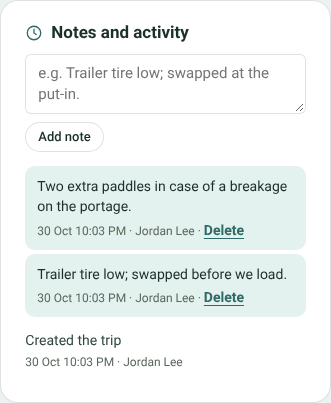
Notes and activity on a trip
Type a note, for example Trailer tire low; swapped at the put-in, and click Add note. Notes show who wrote them and when. You can delete your notes.
If the trip is linked to a meal plan, the meal plan's notes and changes appear here too, and the trip's appear on the meal plan.


