Bulk Update Ingredients Across Recipes
Wholesum now allows you to update an ingredient across multiple recipes at once directly from the Ingredients page.
This is especially useful when you want to standardize ingredient measurements or make bulk recipe adjustments without editing each recipe individually.
For example:
- Change rice from cups to pounds
- Update basil from bunches to ounces
- Adjust quantities across several recipes at the same time
- Rename ingredients consistently across your recipe library
How It Works
Step 1: Go to the Ingredients Page
Navigate to the Ingredients page from the top menu
Find the ingredient you want to update.
Select the ingredient using the checkbox, then click Update Ingredient.
Step 2: Update the Ingredient Details
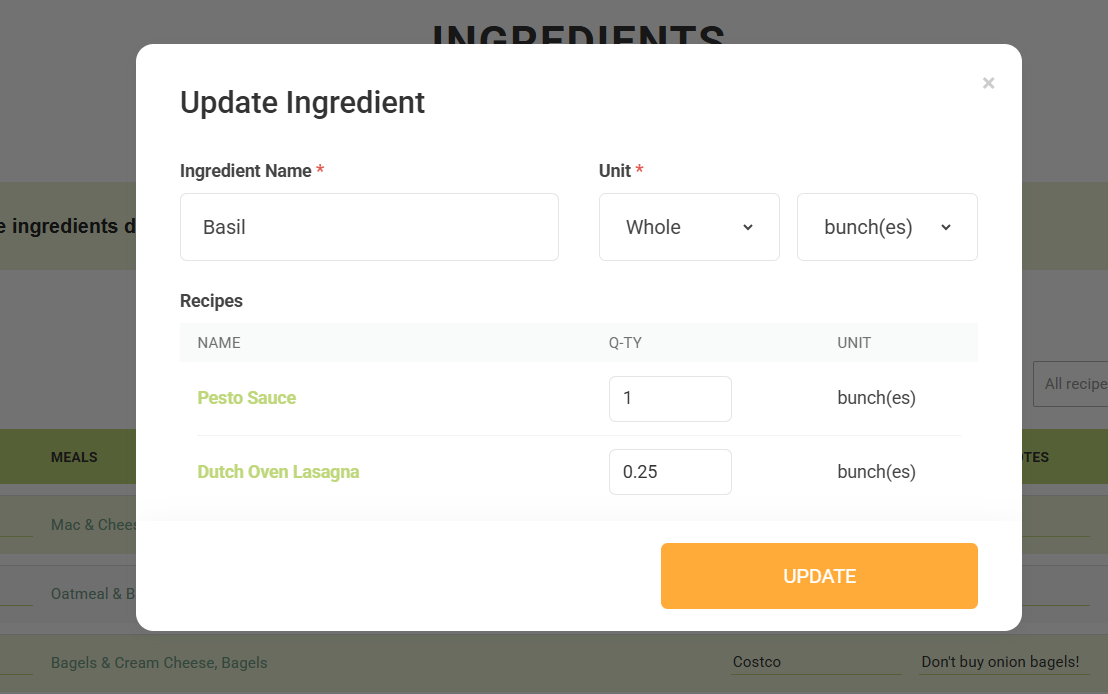
A modal window will open showing:
- Ingredient Name
- Unit Type
- Unit
- Recipes currently using the ingredient
- Quantity used in each recipe
From this screen you can:
- Rename the ingredient
- Change the unit type
- Change the measurement unit
- Adjust quantities recipe-by-recipe
Example:
You may originally have:
2 cups rice4 cups rice
And want to convert them to:
1 pound rice2 pounds rice
You can update all affected recipes from one screen instead of opening each recipe individually.