
Resupply works out what to buy: anything below its reorder point, plus the consumables that upcoming trips will use up. It groups the list by vendor with the last price you paid.
Go to Inventory and click Resupply.
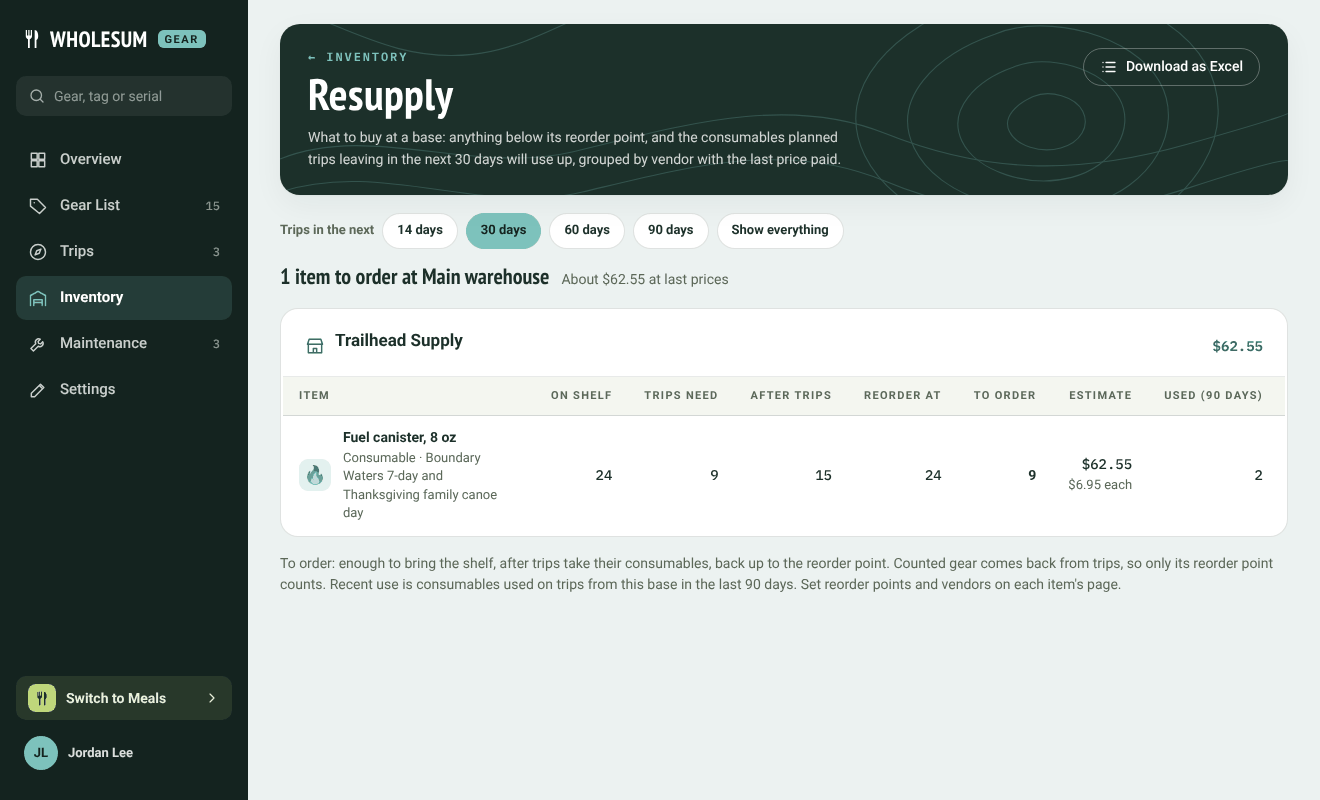
The Resupply page
Reading it
- Trips in the next: choose how far ahead to look: 14, 30, 60 or 90 days. Consumables on planned trips leaving in that window are counted as needed.
- Only what to order shows just the items to buy; Show everything lists every counted item and consumable.
- The summary at the top says how many items to order and the estimated cost at last prices.
For each item:
| Column | Means |
|---|---|
| On shelf | What's there now. |
| Trips need | Consumables that planned trips in the window will use. |
| After trips | What's left once they've gone. |
| Reorder at | The item's reorder point. |
| To order | Enough to bring the shelf, after trips, back up to the reorder point. |
| Last price each and Estimate | From the last delivery you recorded. |
| Used (90 days) | Consumables used on trips in the last 90 days. |
Counted gear (like sporks) comes back from trips, so only its reorder point counts.
If you use more than one base, choose a base at the top: each base has its own list.
Ordering and receiving
- Download as Excel gives you the list to send or keep.
- When a delivery arrives, click Record delivery on the item. Enter how many arrived, who from and the cost each. It goes onto the shelf and the price is kept for next time.
Set each item's reorder point and default vendor on its page in the Gear List. An item with no vendor appears under No vendor set.


