
A unit is one real thing you own: one canoe, one stove, one kitchen bin. Each tracked item and kit has its units listed on its page. Click a unit to open it.
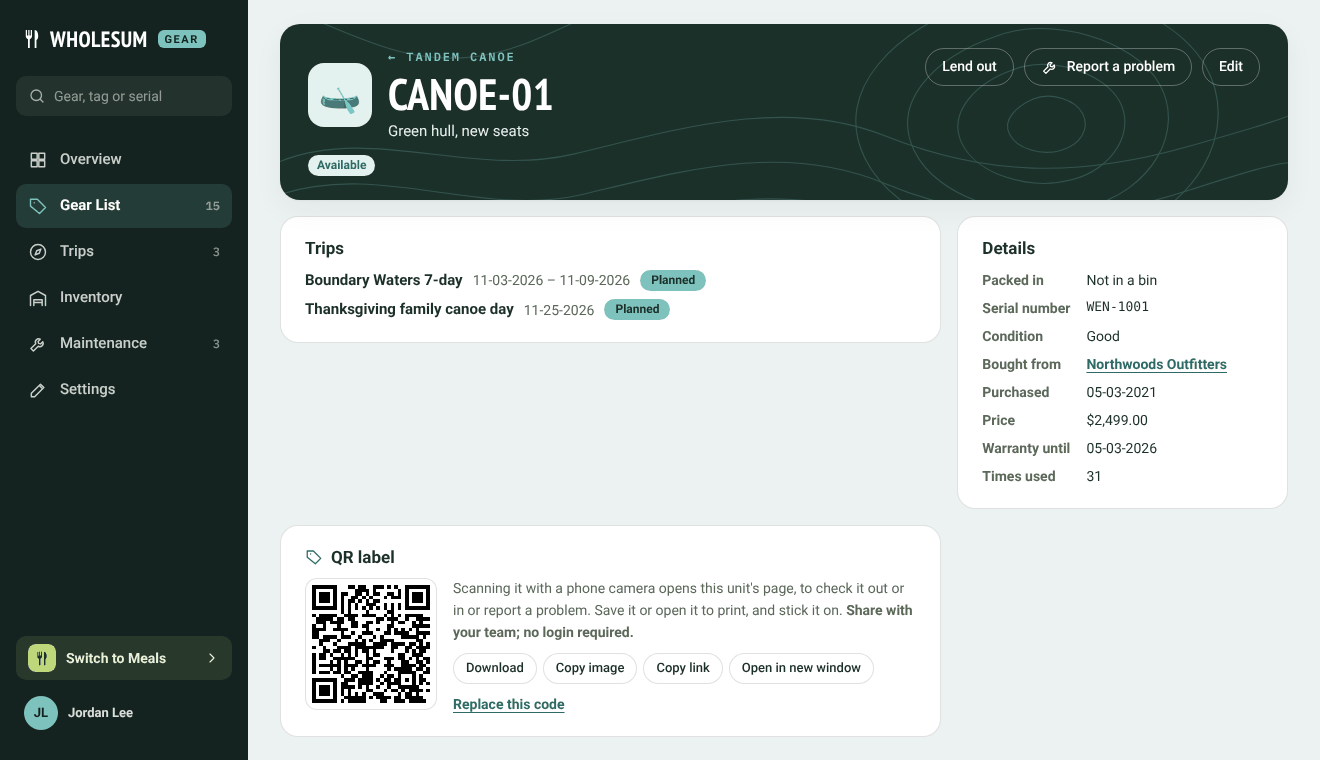
A unit's page
What a unit's page shows
- Status: Available, In maintenance, Retired or Lost. Only available units can go on trips.
- Trips: the upcoming trips this unit is picked for.
- Details: which bin it's packed in, serial number, condition (Good, Fair or Poor), where it was bought, purchase date and price, warranty end date and Times used.
- Back from trips: what check-ins found when it came back, newest first.
- Inspections: when its next inspection is due, and past results.
- QR label: a code to print and stick on it. See QR labels.
The buttons at the top let you Lend out the unit, Report a problem (see Maintenance and repair tickets) and Edit it.
Adding a unit
On the item's page, click Add unit and fill in:
- Asset tag: the label on it, for example CANOE-03. It must be unique.
- Short description: a few words to tell it apart, like "Red hull, new seats". It shows under the tag on packing lists.
- Serial number, Status, Condition and Home base (if you use more than one base).
- Bought from, Purchase date, Purchase price, Warranty expires, Manufactured.
- Times used: Gear counts this up by one each time the unit comes back from a trip. Set a starting number for gear you've used before.
- Notes.
How a unit's status changes
Most of the time, Gear changes it for you:
- Damaged at check-in and marked Needs repair or Out of service → In maintenance, and a repair ticket opens.
- Damaged but Still usable → stays Available, and its condition drops a step.
- Marked Lost at check-in → Lost.
- Repair ticket marked Fixed → back to Available. Written off → Retired.
You can also change the status by hand with Edit.
Retiring rather than deleting
Delete unit (on the edit form) removes the unit and all its history. To keep the history, set its status to Retired or Lost instead. A unit that's out on a trip can't be deleted until it's checked back in.


