
Olive is Wholesum's built-in AI assistant. Olive works from your recipes, ingredients, prices and dietary restrictions to save you hours of setup and checking.
What Olive can do
| Feature | Where to find it |
|---|---|
| Draft a recipe from a sentence | My recipes → Create new recipe → Generate with Olive (AI) |
| Suggest recipe ideas from ingredients you already stock | Same page, Ideas from my ingredients tab |
| Draft recipe instructions from the ingredient list | The Draft instructions with AI button in the recipe editor |
| Review a recipe for portions, dietary conflicts and cost | Review with Olive on any recipe |
| Suggest a substitute for one ingredient | The ✨ button on an ingredient row in the recipe editor |
| Estimate nutrition per serving | Estimate nutrition inside Review with Olive |
| Import a whole binder of recipe cards, PDFs or spreadsheets | Create new recipe → Import from photos, PDF or spreadsheet |
| Draft a whole meal plan from a description of your trip | Tell Olive about the trip on a new meal plan |
| Look up current prices for your ingredients | Update costs with Olive on the Ingredients page |
Olive suggests, you decide
Olive never changes your account on its own. Everything Olive drafts or suggests is shown to you first, and nothing is saved until you click Save or Apply. Olive can make mistakes, so treat its drafts as a starting point and check quantities, units and dietary information before saving.
Who can use Olive
- Enterprise plans get unlimited Olive.
- Every other plan, including your free trial, gets a free allowance of Olive requests to try it out.
How the free allowance works
- The allowance belongs to your account, so you and your team members share it.
- It's shared across all Olive features.
- It's a one-time allowance. It doesn't reset each month, and it carries over when your trial becomes a paid plan.
- You're only charged a request when Olive succeeds. If a request fails or times out, it's free.
What counts as one request:
| Action | Requests used |
|---|---|
| Drafting a recipe, drafting instructions, a recipe review, a nutrition estimate, or a substitute suggestion | 1 each |
| Asking for recipe ideas | 1. Drafting one of the ideas is 1 more. |
| Drafting a meal plan | 1. Olive reading your description first is free. |
| Looking up prices | 1 per run, for up to 50 ingredients |
| Importing files | 1 per file |
| Recalculating a review's cost after you change prices, or saving the dietary flags it suggests | Free |
You'll see how many free requests you have left next to Olive features, for example "18 free left" in the Create new recipe menu:
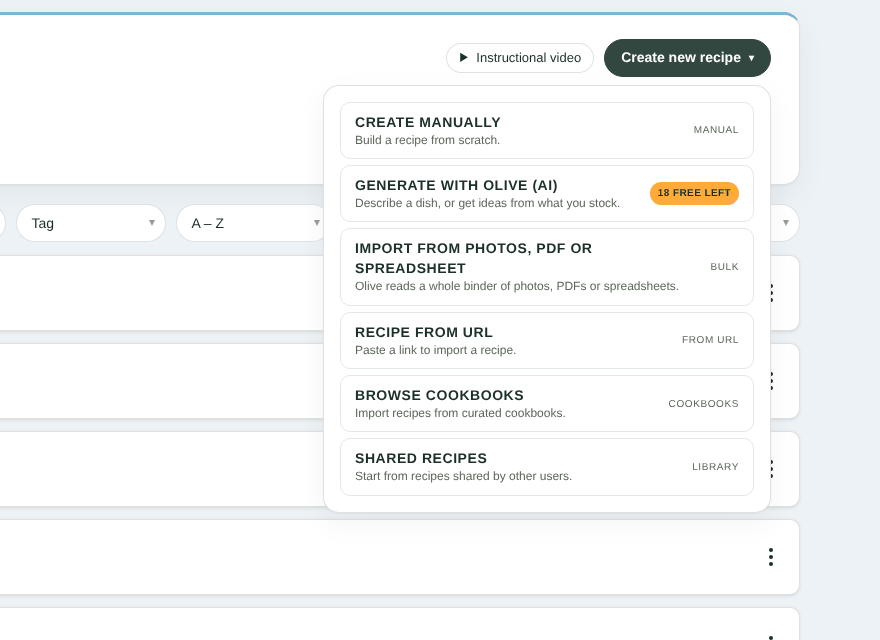
The free-requests badge in the Create new recipe menu

The free-requests count on Review with Olive
When the allowance is used up, Olive features show Enterprise and link to the Pricing page. Upgrade to Enterprise for unlimited Olive.
Olive vs. the support chat
The chat bubble on the Help & Support pages ("Olive — your Wholesum guide") answers questions about using Wholesum. It's free on every plan and doesn't use your Olive allowance.


