
Export settings control what your PDF, Word and Excel shopping lists look like. They apply to every meal plan on your account.
To open them, go to Settings. Under Exports & printing, find Export settings and click Edit.
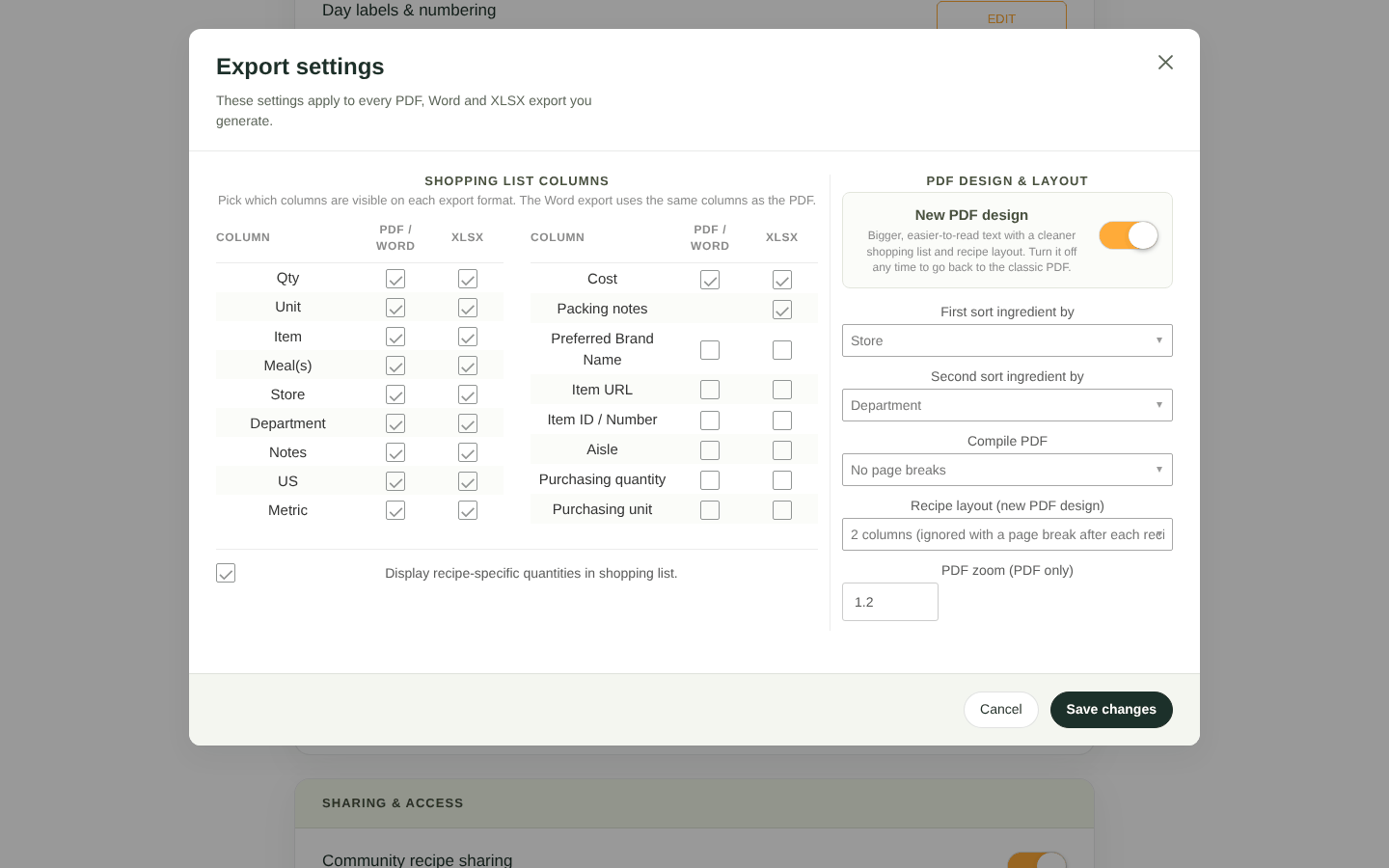
The Export settings window
Shopping list columns
Tick the columns you want in each format. Word exports use the same columns as PDF.
| Column | Shows |
|---|---|
| Qty, Unit, Item | The amount to buy and the ingredient |
| Meal(s) | The recipes that use the ingredient |
| Store, Department | Where to buy it and which section it's in |
| Notes | Your ingredient notes |
| US, Metric | The amount converted to US and metric units |
| Cost | The cost of each line (Personal plan and up) |
| Packing notes | Packing locations (Excel only, when packing notes are on) |
| Preferred Brand Name, Item URL, Item ID / Number, Aisle | Purchasing details from each ingredient's Ingredient Info |
| Purchasing quantity, Purchasing unit | The amount to buy in purchase units, using each ingredient's purchase unit conversion (Enterprise) |
Display recipe-specific quantities in shopping list adds each recipe's share in brackets after its name in the Meal(s) column, for example "Spaghetti Bolognese (30.0)".

Recipe-specific quantities in the Meal(s) column
In PDFs, Item URL doesn't get its own column. Instead, the item and brand names become clickable links, so turn on Preferred Brand Name too.
PDF design & layout
- New PDF design: bigger, easier-to-read text, a cleaner shopping list and recipe cards. Turn it off to go back to the classic PDF.
- First sort ingredient by / Second sort ingredient by: order the list by Store, Department, Item names, Notes or Aisle. The default is Store, then Department, which matches a shop route. This also sorts the shopping list on the meal plan page.
- Compile PDF: No page breaks, Page break after each recipe, or Page break after each day.
- Recipe layout (new PDF design): recipe cards in 1 column or 2 columns. Two columns are ignored if you use a page break after each recipe.
- PDF zoom (PDF only): text size, from 1.0 to 1.5.
Click Save changes.
Team members export with the account owner's export settings, so everyone gets the same layout.


